

Creating videos used to be a time-consuming process. You needed scripting skills, editing software, stock footage, voiceovers, and hours of work to produce a single video. Today, things have changed dramatically thanks to artificial intelligence.
One of the most exciting tools available right now is Agent One in InVideo AI. This powerful AI assistant can create complete videos from a simple text prompt, helping content creators, marketers, businesses, and beginners save countless hours.
If you’ve heard about Agent One but aren’t sure how it works, this guide will walk you through everything you need to know.
What Is Agent One in InVideo AI?
Agent One is an advanced AI-powered video creation assistant built into InVideo AI. Instead of manually editing videos scene by scene, you simply describe the video you want to create, and the AI handles the rest.
The tool can automatically:
- Generate video ideas
- Write complete scripts
- Select relevant visuals
- Add AI voiceovers
- Create subtitles
- Add music and transitions
- Produce a finished video ready for publishing
Think of Agent One as your personal video production team that works within minutes.
Why So Many Creators Are Using Agent One
Video content is dominating platforms like YouTube, TikTok, Instagram Reels, and Facebook. However, creating videos consistently can be challenging.
Agent One helps solve this problem by reducing the workload significantly.
Some major benefits include:
- Faster video creation
- No editing experience required
- Professional-quality results
- Reduced production costs
- Ability to create content at scale
- Support for multiple languages
Whether you’re a YouTuber, affiliate marketer, educator, or business owner, Agent One can help you produce more content in less time.
How to Access Agent One
Getting started is simple.
First, log in to your InVideo AI account. If you don’t already have an account, create one using your email address.
Once inside the dashboard, you’ll find the AI video creation interface. This is where Agent One works its magic.
The platform is designed to be beginner-friendly, so you won’t feel overwhelmed even if it’s your first time using AI video tools.
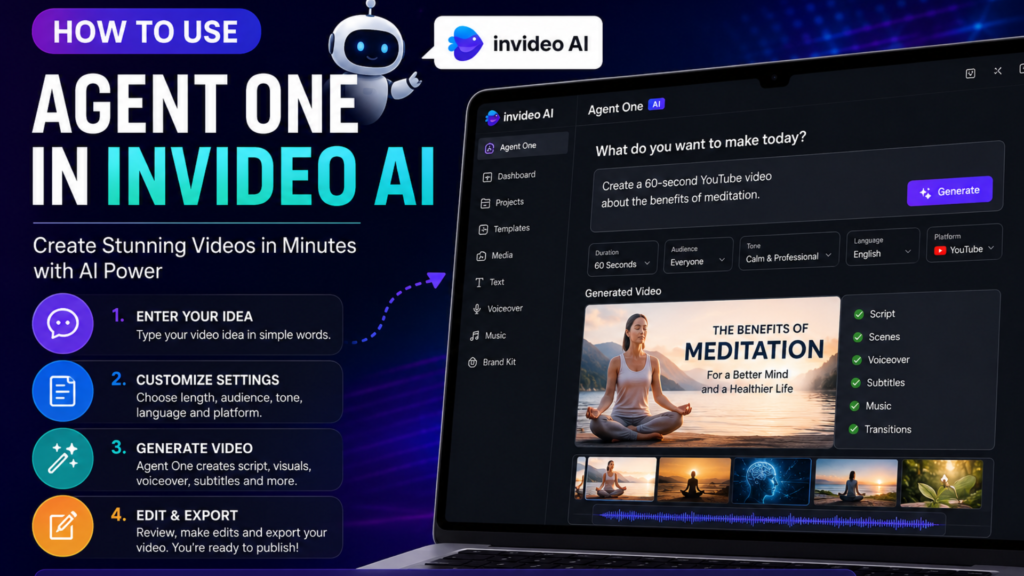
Step 1: Enter Your Video Idea
The first thing Agent One needs is a prompt.
A prompt is simply a description of the video you want to create.
For example:
“Create a two-minute YouTube video explaining the benefits of meditation for beginners.”
Within seconds, Agent One analyzes your request and begins creating the content.
The more specific your prompt is, the better the results will be.
Instead of writing:
“Make a fitness video.”
Try writing:
“Create a 60-second motivational fitness video for beginners focusing on weight loss and healthy daily habits.”
Specific prompts help the AI understand your goals more clearly.
Step 2: Choose Your Video Settings
Before generating the video, you’ll have the opportunity to customize several settings.
These typically include:
Video Length
Choose how long you want your video to be.
Options may include:
- 30 seconds
- 60 seconds
- 2 minutes
- 5 minutes
- Custom length
Target Audience
Tell Agent One who the video is for.
Examples include:
- Students
- Business owners
- Parents
- Beginners
- Professionals
Tone of Voice
You can choose the overall style of the content.
Popular options include:
- Professional
- Friendly
- Educational
- Inspirational
- Entertaining
- Promotional
Language
If your audience speaks a different language, Agent One can generate videos accordingly.
This is especially useful for creators targeting international audiences.
Step 3: Generate the Video
Once your settings are configured, click the Generate button.
This is where the magic happens.
Agent One automatically:
- Writes the script
- Divides the content into scenes
- Selects visuals
- Creates narration
- Adds subtitles
- Inserts transitions
- Adds background music
Depending on the complexity of your project, the process usually takes only a few minutes.
Step 4: Review the AI-Generated Video
After the video is generated, spend some time reviewing it carefully.
While Agent One produces impressive results, it’s always a good idea to make sure everything matches your expectations.
Check:
- Script accuracy
- Visual relevance
- Voiceover quality
- Subtitle timing
- Branding consistency
A quick review can significantly improve the final result.
Step 5: Make Custom Edits
One of the best things about InVideo AI is that you’re not locked into the AI-generated version.
You can edit nearly every aspect of the video.
Edit the Script
Need to add information or improve a section?
Simply edit the text directly.
Change Visuals
You can replace AI-selected footage with:
- Personal videos
- Product images
- Brand assets
- Custom graphics
Adjust Voiceovers
Switch between different AI voices and speaking styles until you find the perfect fit.
Customize Subtitles
You can change:
- Font styles
- Colors
- Sizes
- Placement
This helps align the video with your brand identity.
Best Practices for Getting Better Results
After creating multiple videos with Agent One, many users discover that a few simple strategies can dramatically improve output quality.
Be Detailed in Your Prompts
The AI performs best when it receives clear instructions.
Include:
- Topic
- Audience
- Tone
- Video length
- Platform
The more context you provide, the better the final video will be.
Mention Your Platform
Videos for TikTok are different from videos for YouTube.
Tell Agent One exactly where the video will be published.
For example:
“Create a vertical Instagram Reel explaining five healthy breakfast ideas.”
This helps optimize the content format.
Include a Call to Action
If you’re creating marketing videos, include instructions for a call to action.
Example:
“End the video by encouraging viewers to subscribe and visit our website.”
Review Before Publishing
AI is powerful, but human review remains important.
Always check facts, branding, and messaging before uploading your content.
Who Should Use Agent One?
Agent One is suitable for a wide range of users.
YouTubers
Generate tutorials, reviews, educational videos, and faceless YouTube content quickly.
Affiliate Marketers
Create product reviews and promotional videos without hiring editors.
Small Businesses
Produce marketing videos on a budget.
Social Media Creators
Create engaging short-form videos for TikTok, Instagram Reels, and Facebook.
Educators
Turn lessons and educational content into professional video presentations.
Agent One in InVideo AI is changing the way videos are created. What once required multiple tools, expensive software, and hours of editing can now be accomplished through a simple text prompt.
For content creators looking to save time, increase productivity, and publish more videos consistently, Agent One offers an incredibly powerful solution.
Whether you’re creating YouTube videos, social media content, business promotions, or educational materials, Agent One can help transform your ideas into professional videos within minutes.
As AI technology continues to evolve, tools like Agent One are making high-quality video production accessible to everyone, regardless of technical skill or experience.